The Art Hustlers’ Studio and The HackerNoon Podcast, I’ve gathered plenty of lessons—mostly by trial and error, and doing things wrong before getting them right. I’m not an audio engineer, nor do I claim to be an expert in sound production. But one day in 2020, I bought a mic, hit record, and began learning by messing up—repeatedly.
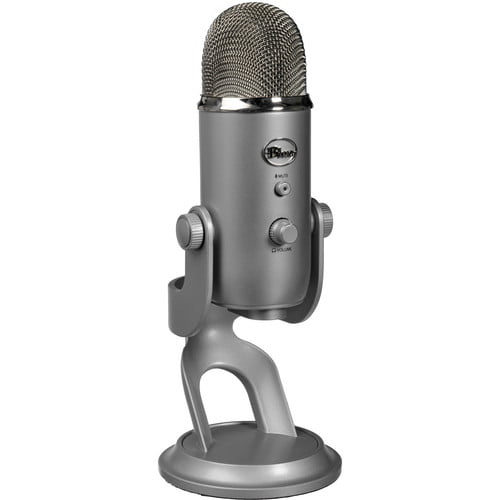
From recording half an episode with my mic muted to capturing some truly awful in-person audio due to poor mic placement, I’ve made nearly every beginner mistake in the book. And that’s exactly why I’m writing this: so you don’t have to. This guide focuses on optimizing your Blue Yeti mic settings for podcasting, with the hope that my missteps can help you sound pro faster.
Getting to Know Your Blue Yeti Mic
Let’s start with the basics: the knobs and dials on your Yeti. They might look simple, but each one can make or break your recording.
The Mute Button
This little guy has ruined full episodes for me. A solid red light means you’re good to go—mic is active. If it’s flashing, your mic is muted, and you’re not recording anything (ask me how I know). Make this visual check part of your pre-recording ritual.
The Volume Dial (Front)
You’ll see a volume knob on the front. This only affects headphone volume if you’re monitoring directly through the mic’s 3.5mm jack. If you’re not monitoring through the mic itself, you can basically ignore this dial.
The Gain Control (Back)
This is the most sensitive control on the Yeti. Gain determines how much sound your mic picks up. Too high? You’ll get distortion and clipping. Too low? You’ll sound like you’re whispering from across the room.
Here’s a tip from hard-earned experience:
🎙 Start with your gain dial set around 9 o’clock. I keep mine at 8 o’clock since I record inside a vocal booth. It’s better to record slightly too quiet than too loud—volume can be boosted in post, but distortion is forever.
Understanding Pickup Patterns
The dial below the gain control is the pattern selector. Each mode changes how your mic captures sound. For podcasting, this setting is crucial.
The Four Pickup Modes
Cardioid (looks like a little butt or heart): Use this 99% of the time. It captures sound directly in front of the mic—perfect for solo podcasting.
- Omnidirectional: Picks up sound from all directions. Great for roundtable discussions with one mic.
- Bidirectional: Captures front and back, good for one-on-one in-person interviews.
- Stereo: Adds depth for music or ambiance, but not ideal for dialogue.
- Make sure to use cardioid for single-person podcasting. That little butt-shaped icon is your best friend.
How to Position Your Mic (Don’t Talk Into the Top)
This is a big one: the Yeti is a side-address mic, meaning you speak into the front side—not the top. I know it looks like a mic you should point at your mouth, but don’t. Keep it upright and aim your voice at the front grill.
Also, don’t get too close. You’ll breathe heavily into the mic and introduce popping sounds. About a foot of distance works best. If needed, slightly increase the gain instead of leaning in too close.
Read More: “Spicy” OnlyFans Flight Attendant: The Problem With Her Content
Real Talk from the HackerNoon Team Slack 🧵
A few snippets from the #podcast Slack channel at HackerNoon:
- Alex Cobb: “Someone may have clipped… the entire episode.”
- Amy: “David, you probs just need to set your gain to 9 o’clock. Clipping = too loud.”
- David: “Gain was at 3 o’clock. Just moved to 9.”
- Amy: “And don’t forget the ‘butt icon’ setting!”
- Linh: “What’s going on??? I don’t understand anything =)))”
- Alex: “It’s called cardioid, but that’s SO much less fun to say.”
- Guy: “Glad my $30 mic isn’t the problem. It’s just my squeaky chair.”
- Alex: “Please get some WD-40. Also, never mute your Zoom call—ever.”
- Amy: “10/10 have recorded entire episodes muted. Learn from me.”
Moral of the story: Everyone messes up audio. But if you communicate and tweak settings together, your podcast team will thank you.
Final Thoughts
Podcasting has been one of the most rewarding (and occasionally embarrassing) creative outlets I’ve explored. Each botched episode and distorted track taught me something new—and pushed me closer to sounding like I know what I’m doing. If you’re using a Blue Yeti, trust that it’s a solid mic. But understanding how to use it well is what really makes the difference.
If you want to hear how this all plays out in real time, check out The Art Hustlers’ Studio or The HackerNoon Podcast on Apple, Spotify, or wherever you get your audio fix. Until next time, I’ll be out here—podding hard, mic unmuted.
