If you’re wondering whether Instagram notifies users when you take a screenshot of their Story or post, you’re not alone. Many users compare this to Snapchat, which alerts users to such actions. Fortunately for Instagram users who prefer to browse discreetly, the platform does not currently notify users when they screenshot their Stories or feed posts.
This guide covers everything you need to know about Instagram screenshot notifications, including direct messages, vanish mode, and content sharing. Whether you’re saving content for later or simply curious, this article offers a complete breakdown.
Screenshotting Instagram Stories and Grid Posts
You can safely screenshot or screen-record any Instagram Story or grid post without alerting the user. Instagram does not send notifications for these actions. This includes photos, videos, carousels, and screen recordings of content on a user’s profile.
Even frequent app users who consistently capture content for inspiration or reference won’t trigger any alerts. Instagram does not have a built-in system to report regular screenshots or recordings outside of specific private message settings.
Screenshotting Instagram Direct Messages
Standard Direct Messages (DMs)
In traditional one-on-one chats, you can safely screenshot messages without generating any notification. This includes text conversations, shared posts, and media sent from the camera roll.
Vanish Mode and Privacy Notifications
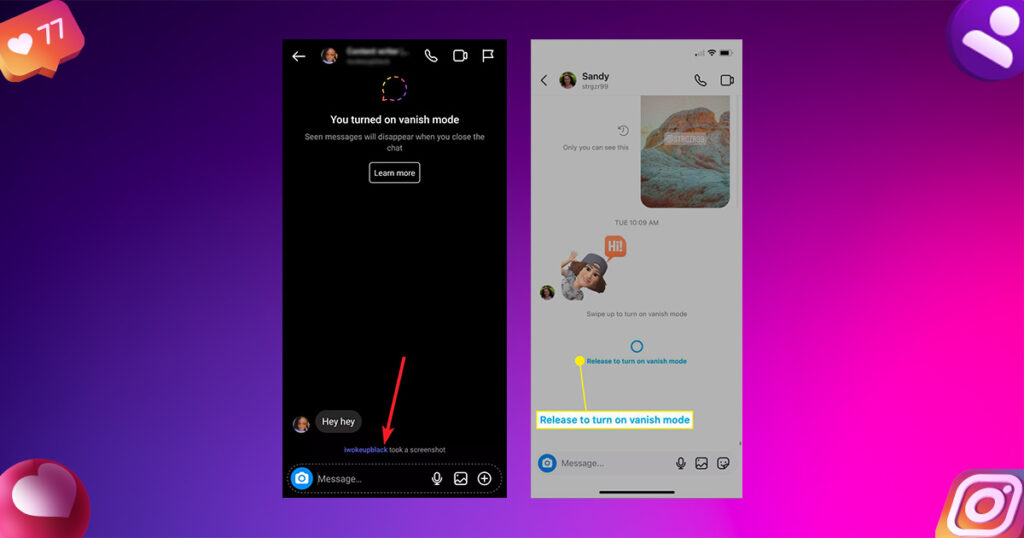
However, privacy rules change when using Instagram’s Vanish Mode. This feature is designed for disappearing messages, and any screenshots taken while it’s active will notify both users. If someone captures a screenshot while Vanish Mode is enabled, Instagram displays a notification within the chat thread stating:
Vanish Mode is activated by swiping up within a chat window, turning the interface dark, and enabling ephemeral messaging. Once the chat is closed, all messages disappear, and Instagram assumes a higher level of privacy protection — hence the screenshot alert system.
Screenshots of Media Sent via Instagram Camera
Instagram has experimented with screenshot alerts in direct messages involving the in-app camera. Previously, when someone sent a disappearing photo using Instagram’s camera (not from the gallery), and the recipient took a screenshot, Instagram would notify the sender.
This alert appeared as a small shutter icon next to the image. However, this functionality has changed recently. Instagram now blocks screenshots and recordings of disappearing photos with a pop-up message stating:
“You can’t screenshot or record this. It’s only meant to be replayed once.”
If the sender chooses the “replay” option instead of “view once,” and you screenshot that image, Instagram no longer sends a notification. These updates are part of Instagram’s evolving privacy policies, and they may continue to shift over time.
How Business Account Insights Can Reveal Content Sharing
While Instagram does not explicitly notify users when their posts are screenshotted, there are indirect ways content owners can detect unusual activity. If you operate a business or creator account, you gain access to in-depth post analytics.
By selecting “View Insights” under a post, you can view key metrics, including:
- Reach and profile visits
- Engagement metrics
- Number of shares
- Number of saves
While this data won’t tell you who took the action, it provides insight into how many users have saved or shared your content privately. High numbers here could indicate that your post is being circulated beyond visible likes and comments.
Summary of Screenshot Rules on Instagram
Here’s a quick overview of when Instagram does and does not notify users of screenshots:
| Feature | Screenshot Notification |
|---|---|
| Grid Posts | ❌ No notification |
| Stories | ❌ No notification |
| Reels | ❌ No notification |
| Standard DMs | ❌ No notification |
| Vanish Mode | ✅ Notification triggered |
| Disappearing Photos (In-app camera) | ✅ Notification or screenshot block |
| Photos from Camera Roll in DM | ❌ No notification |
As of now, only Vanish Mode and disappearing images sent using Instagram’s in-app camera are protected by screenshot alerts or blocks. All other interactions — including stories, profile photos, and shared feed posts — can be screenshotted without the other user knowing.
How Instagram May Evolve Screenshot Features
Instagram’s privacy features are constantly evolving. Over the past year alone, policies around screenshotting in direct messages and disappearing media have changed multiple times. While current rules offer users the freedom to capture most content, future updates could implement stricter monitoring systems, similar to those used by Snapchat.
For users concerned about privacy, it’s essential to stay updated on these features, especially when using tools like Vanish Mode or sending time-sensitive images.
Best Practices for Respectful Instagram Browsing
While taking screenshots is unrestricted mainly on Instagram, users should be mindful of content ownership and privacy. Here are a few best practices to consider:
- Avoid sharing someone else’s content without permission
- Use saved posts or collections for organizing inspiration privately
- Refrain from capturing sensitive or private DMs
- Respect content marked as “View Once” or sent in Vanish Mode
- Being a responsible social media user means balancing curiosity with consideration.
Final Thoughts
Instagram allows a high degree of discretion when it comes to capturing content. Stories, feed posts, and Reels can be freely screenshot or recorded without alerting the original creator. However, the introduction of features like Vanish Mode and disappearing messages brings stricter screenshot policies into play.
Whether you’re a content creator or casual user, staying informed about Instagram’s evolving rules is essential. And if privacy is a priority, Vanish Mode and in-app disappearing media offer an extra layer of protection.
