With over 200 mobile phones snatched daily in the UK, thieves are not only targeting devices but also exploiting personal data and banking apps to steal thousands of pounds. As smartphones have become central to our lives, securing them against theft and unauthorized access is paramount. This guide, inspired by insights from financial experts like Claer Barrett and Martin Lewis, provides a detailed roadmap to safeguard your phone and its sensitive contents. From simple settings tweaks to advanced security measures, these strategies ensure your device and data remain protected even in the worst-case scenario.
The Rising Threat of Phone Theft
Understanding the Surge in Snatch Thefts
Phone theft has surged dramatically, with a 40% increase in London alone in 2024, according to the Metropolitan Police. The Home Office reports a 150% rise in “snatch thefts” over the past year, equating to approximately nine phones or bags stolen hourly across the UK. Thieves are employing a cunning tactic known as “shoulder surfing,” where they observe victims entering their PINs before snatching the phone, often while it’s unlocked, granting immediate access to sensitive apps and data.
This method allows criminals to bypass basic security measures, making it critical for users to adopt proactive defenses. The financial impact is severe, as thieves can access banking apps, digital wallets, and personal information, potentially leading to losses in the thousands. Beyond selling the handset for a few hundred pounds, the real prize for thieves lies in exploiting your data for identity and financial fraud.
Why Phone Theft Is So Lucrative
An unlocked phone is a gateway to your financial and personal life. Banking apps, email accounts, and stored passwords can be exploited to transfer funds, take out loans, or commit identity theft. Unlike physical bank cards, which have a £100 contactless payment limit, digital wallets like Apple Pay, Samsung Pay, or Google Pay often have no such restrictions, enabling thieves to make large unauthorized purchases. Protecting your phone is not just about safeguarding the device but also about securing your financial stability and personal identity.
Read More: Samsung’s Next Galaxy Unpacked Will Reveal Its ‘Ultra’ Foldable

Immediate Steps to Secure Your Phone
Protecting your phone starts with simple, accessible measures that every user can implement. These steps enhance your device’s security and minimize the risk of data exposure if stolen.
Enable Device Tracking Apps
Setting up a tracking app like Apple’s Find My Phone, Samsung’s SmartThings Find, or Google’s Find My Device is essential before a theft occurs. These apps allow you to locate your phone, lock it remotely, or wipe its data if recovery is unlikely. Key features include:
- Lost Mode: Suspends payment methods (e.g., Apple Pay) and displays a contact number for recovery.
- Remote Wipe: Erases all data, protecting photos, videos, and sensitive information (ensure regular backups to avoid permanent loss).
- Remote Lock: Available on Samsung and Android devices, this locks the phone with a phone number for recovery.
To set up, visit the respective guides for Apple, Samsung, or Google devices. Access these features via another device, such as a computer or a friend’s phone, in case of theft.
Activate Biometric Security
Biometric authentication, such as facial recognition or fingerprint scanning, adds a robust layer of security. Unlike PINs, which can be observed through shoulder surfing, biometrics are unique to you and harder for thieves to replicate. Most modern smartphones (post-2017) support these features. Configure biometrics for:
- Phone Unlocking: Set up facial or fingerprint recognition in your phone’s settings.
- Banking Apps and Digital Wallets: Ensure apps like Monzo or digital wallets require biometric verification, not just a tap to access. Check the app’s security settings to enable this.
For older devices without biometric support, use a unique PIN for banking apps, distinct from your lock screen PIN, and never store it on your phone.
Store Your IMEI Number Safely
Every mobile device has a unique 15-digit International Mobile Equipment Identity (IMEI) number, which is critical for reporting a stolen phone. To find it, dial *#06# on your phone, and the IMEI will display on the screen. Alternatively, check device-specific guides for Apple, Samsung, or Google phones. Screenshot the number and store it securely on another device or email it to yourself. Provide this number to the police and your network provider to block the phone from connecting to any network.

Disable Lock Screen Notifications
Many apps, including banks, send security codes or notifications that appear on your lock screen. Thieves can view these without unlocking your phone, gaining access to sensitive information. Disable preview notifications to ensure only the app name appears, not the message content. Adjust this in your phone’s notification settings for iOS, Samsung, or Android devices.
Regular Backups for Data Protection
Regularly backing up your phone ensures that photos, videos, and other irreplaceable data are safe. Backups also allow you to confidently wipe your device remotely if stolen. Use cloud services like iCloud for iPhones or Google Drive for Android devices. Guides for backing up iPhones and Samsung/Google devices are available online. Schedule automatic backups to minimize data loss.
Advanced Security Measures for Enhanced Protection
Beyond basic precautions, these advanced techniques offer additional layers of security, particularly for users with modern devices or those seeking maximum protection.
Create a Secure Folder for Sensitive Apps
Many smartphones allow you to create a hidden folder protected by biometrics to store banking and other sensitive apps. This makes it harder for thieves to access critical apps even if they unlock your phone. iPhones, Samsungs, and other Android devices support secure folders or private spaces. Check device-specific instructions to set this up, ensuring apps like banking and email are shielded behind an additional security layer.
Restrict Control Centre Access on iPhones
Thieves can access the Control Centre on a locked iPhone to enable Airplane Mode, rendering tracking apps like Find My iPhone useless. To prevent this, disable Control Centre access when the phone is locked:
- Go to Settings.
- Select Face ID & Passcode (disable Screen Time PIN if active).
- Toggle off Control Centre.
This ensures thieves cannot disable connectivity without unlocking the device.
Set a Screen Time PIN on iPhones
A Screen Time PIN restricts access to critical settings, such as Apple ID or Face ID, preventing thieves from disabling tracking or biometric security. Configure this in the Screen Time settings, choosing a PIN different from your lock screen PIN. This feature, typically used for parental controls, adds a robust barrier against unauthorized changes.
Enable Multiple User Profiles on Android
Samsung and other Android devices support multiple user profiles, allowing you to create a restricted home screen for public use without sensitive apps like banking. Switch to a secure profile at home to access these apps. This setup ensures thieves accessing your phone in public see a limited interface, reducing the risk of data exposure.
Activate Stolen Device Protection on iPhones
For iPhones running iOS 17.3 or later, enable Stolen Device Protection. This feature requires biometric authentication to access Apple Wallet in unfamiliar locations (e.g., not home or work) and imposes a one-hour delay for changing critical settings like passwords. This gives you time to report the theft and lock the device remotely.
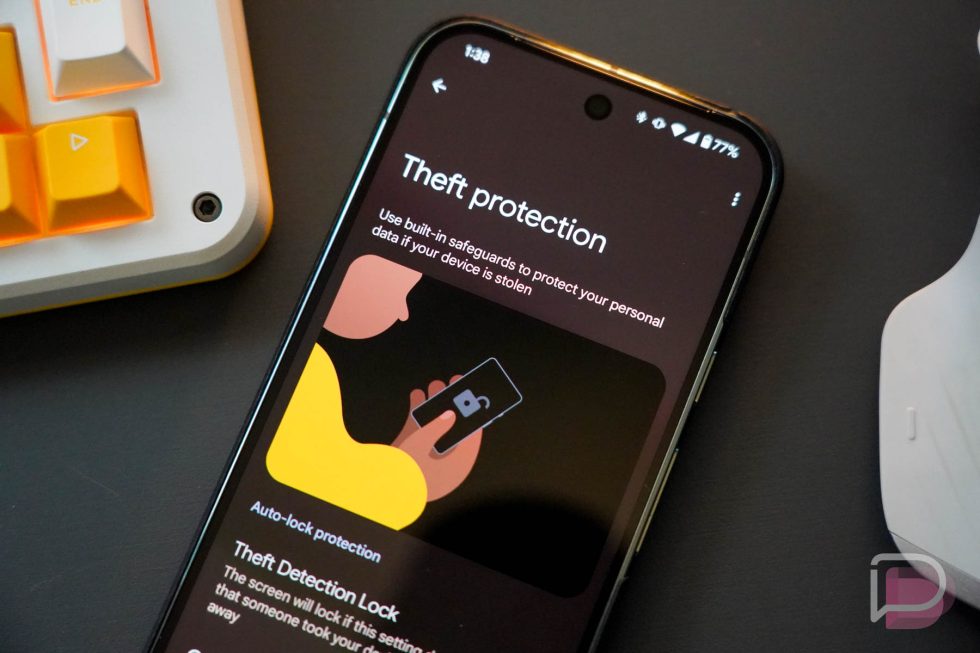
Enable Theft Protection on Samsung and Android
Samsung and Android devices offer Theft Protection features, including:
- Theft Detection Lock: Automatically locks the phone if it detects rapid movement, such as a thief running or cycling away.
- Offline Device Lock: Locks the phone if it’s taken offline or put into Airplane Mode.
Activate these in your device’s security settings to ensure automatic protection against common theft tactics.
Use a Spare Device for Banking
For maximum security, consider using a spare or old phone exclusively for banking apps and keep it at home. This isolates sensitive apps from your primary device, reducing risk if your main phone is stolen. While less convenient for those needing mobile banking on the go, this approach significantly enhances security.
Managing Your Digital Wallet
Digital wallets like Apple Pay, Samsung Pay, and Google Pay are convenient but risky if a phone is stolen. Unlike physical cards, digital wallet transactions often have no spending limit, allowing thieves to rack up significant charges. To mitigate this:
- Limit Stored Cards: Reduce the number of cards in your digital wallet to minimize potential losses.
- Monitor Accounts: Regularly check linked bank accounts for unauthorized activity.
- Report Thefts Immediately: Contact your bank to freeze accounts and digital wallet cards if your phone is stolen.
Implementing Two-Factor Authentication (2FA)
Two-factor authentication adds a second verification step, such as a code from an authenticator app, to protect your accounts. Avoid relying on SMS codes, as thieves with access to your phone can intercept them. Instead, use apps like Microsoft Authenticator or Google Authenticator, which require biometric verification. Set up 2FA for critical accounts like iCloud, Samsung, or Google, and add a trusted secondary phone number for recovery if your primary device is stolen.
What to Do If Your Phone Is Stolen
If your phone is stolen, act quickly to minimize damage:
Step 1: Use Tracking Apps
Log into your tracking app (Find My Phone, SmartThings Find, or Find My Device) from another device to locate, lock, or wipe your phone. If you’ve forgotten your tracking app password, Samsung and Android users can still remotely lock the device.
Step 2: Report to the Police
Call 101 to report the theft, providing your IMEI number and any relevant details. Avoid calling 999 unless it’s an emergency. A crime reference number is required for insurance claims.
Step 3: Notify Financial Institutions
Contact your bank, building society, or credit union immediately to freeze accounts and prevent fraudulent transactions. Monitor your credit report through TransUnion, Equifax, or Experian to detect unauthorized activity. Consider adding a CIFAS marker to your credit file for extra protection against fraud.
Step 4: Change Passwords
Update passwords for all accounts linked to apps on your phone, including digital wallets, shopping, and streaming services. Use a secure device to make these changes.
Step 5: Contact Your Insurer
If you have mobile phone insurance, file a claim with your crime reference number. Check your home insurance policy for coverage, as some include theft outside the home as an optional extra. Packaged bank accounts may also provide mobile insurance—review the terms to confirm.
Step 6: Stay Vigilant for Scams
Thieves may use stolen data to impersonate your bank or commit further scams. Follow guidance from scam prevention resources to protect yourself from additional fraud.
Understanding Mobile Insurance Limitations
Mobile phone insurance typically covers the cost of replacing a stolen device, subject to an excess, but does not cover financial losses from unauthorized transactions. Check your policy details, as coverage varies. Home insurance may cover theft inside the home, with optional extras for external theft. Packaged bank accounts might include mobile insurance—review terms to avoid overpaying for unnecessary perks.
Practical Tips for Everyday Vigilance
Preventing theft requires proactive habits:
- Limit Public Phone Use: Avoid using your phone in busy areas, especially near Tube or train stations, where snatch thefts are common.
- Stay Aware: Observe your surroundings and use your phone in quieter areas, away from roadsides.
- Secure Your Device: Use a phone case with a strap or lanyard to keep it physically secure, deterring opportunistic thieves.
- Avoid Storing Passwords: Never save passwords in notes apps. Use a password manager for secure storage.
Feedback and Community Engagement
This guide aims to empower users with actionable steps to protect their phones. Share your experiences or additional tips in the Phone Theft Protection Tips forum thread to help refine this resource and support others.
Conclusion
With phone thefts on the rise and thieves employing sophisticated tactics like shoulder surfing, securing your mobile device is more critical than ever. By implementing simple measures like enabling tracking apps and biometrics, alongside advanced strategies like secure folders and Theft Protection, you can significantly reduce the risk of financial and personal data loss. If your phone is stolen, swift action—such as reporting to the police, locking your device, and notifying your bank—can mitigate damage. Stay vigilant, back up your data regularly, and adopt these security practices to ensure your phone and its contents remain safe.
